
I still remember the first time I deployed a CDN on a project.
I was expecting magic. Like… boom 💥 website becomes instant everywhere in the world.
But what actually happened?
Some pages became faster. Some… barely changed.
And a few? Still felt slow for no clear reason.
That’s when I realized something important:
👉 A CDN is not a “make everything fast” button.
It’s a smart delivery system, and if you use it wrong, you won’t feel the benefit at all.
Let’s break it down in a simple, real-world way.
The illusion: “CDN = instant website”
When you first hear about CDN, it sounds powerful.
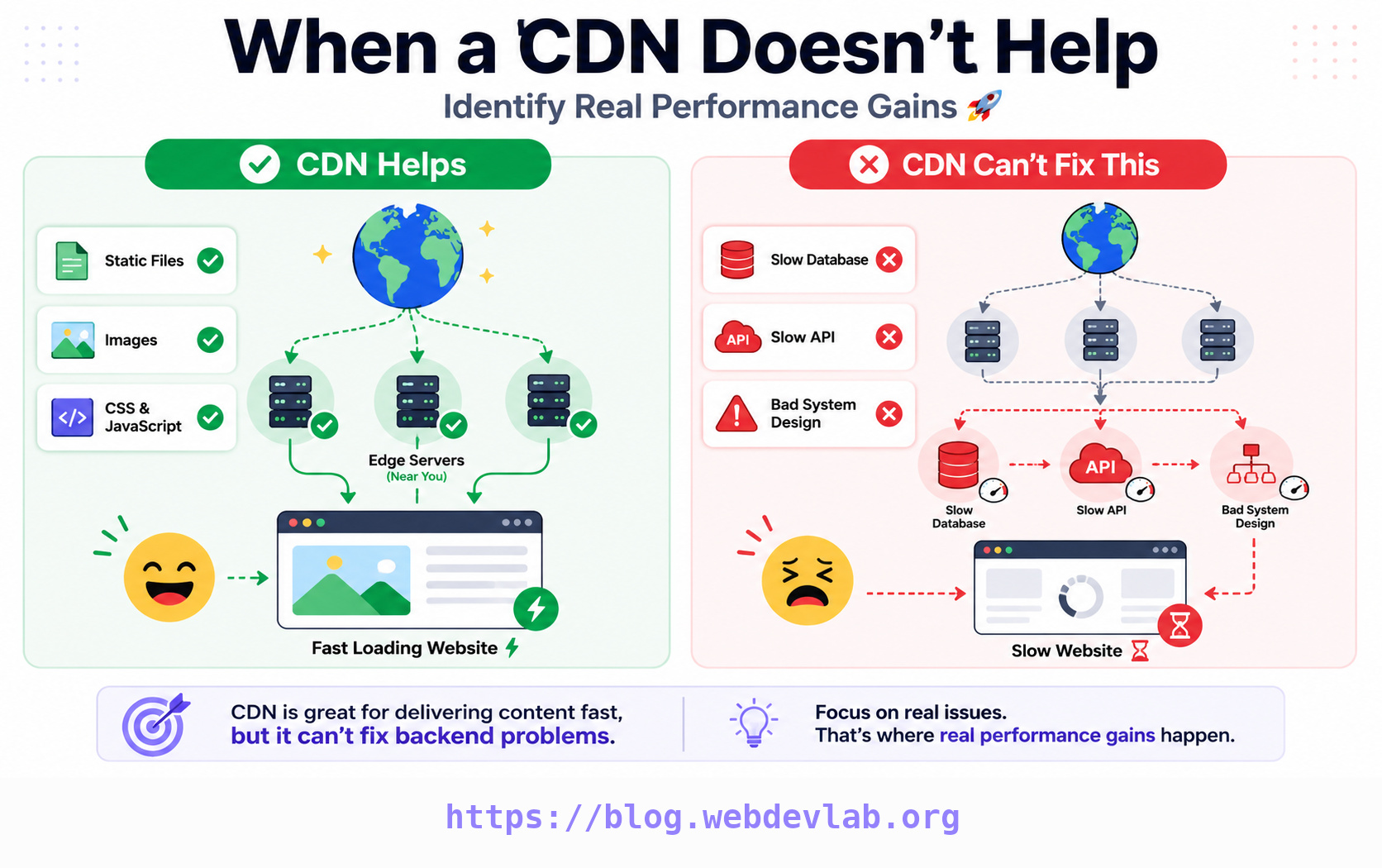
A Content Delivery Network is basically a group of globally distributed servers that cache your content closer to users.
So instead of loading data from one origin server (maybe in the US or Europe), users get it from a nearby edge server.
In theory:
* Less distance
* Less latency
* Faster loading
Sounds perfect for web development, backend systems, and modern system design, right?
But here’s the catch…
Why CDN sometimes doesn’t feel fast
I learned this the hard way while working on real projects (especially API-heavy apps and dashboards).
CDN helps only when:
* Content is cacheable (images, JS, CSS, static files)
* Users are far from your origin server
* Requests hit cache (cache hit ratio is high)
But it becomes almost useless when:
1. Your content is dynamic
If your site is heavy on:
* real-time APIs
* personalized dashboards
* authentication-based data
Then every request still goes back to the origin server.
CDN can’t “magically cache logic”.
2. Cache is not configured properly
This is a big one.
If cache-control, TTL, or headers are wrong…
your CDN is basically doing extra work for nothing.
I’ve seen projects where developers added Cloudflare but never optimized caching rules.
Result? No real improvement.
3. Your backend is the real bottleneck
Sometimes we blame frontend speed or network…
But the real issue is:
* slow database queries
* bad API design
* unoptimized backend architecture
No CDN in the world can fix a slow backend web development system.
That’s a pure system design problem.
4. Low geographic distribution problem
If most of your users are already close to your server location, CDN impact becomes minimal.
Distance advantage disappears.
My real experience (important part)
In almost every project I build, I use Cloudflare CDN.
It’s my default choice. Not because it’s perfect, but because it’s reliable, easy, and fits almost every modern web development workflow.
I’ve also used AWS CloudFront in production systems when deeper AWS integration was needed.
Both are solid.
But here’s something honest:
👉 CDN doesn’t fix bad architecture.
👉 It only enhances good architecture.
So when DOES CDN actually shine?
CDN gives real value when:
* You serve static assets (images, JS, CSS)
* You have global users
* You want faster TTFB (Time To First Byte)
* You need DDoS protection and security layers
* You want to reduce origin server load
This is where CDN feels like magic.
Your website suddenly feels:
⚡ instant
⚡ responsive
⚡ globally optimized
The mental model that helped me
Think of it like this:
👉 Origin server = main warehouse
👉 CDN = local shops around the world
If everyone orders from warehouse → slow delivery
If everyone orders from nearby shop → fast delivery
But if the item is custom-made every time…
local shops can’t help much.
That’s CDN in one line.
Where AI and modern systems fit in
In modern AI-powered applications, SaaS platforms, and automation systems:
* Static assets → CDN works great
* API + AI responses → CDN has limited role
* Real-time systems → architecture matters more than caching
This is why understanding CDN is important in system design interviews too.
Not just “what it is”…
but when it actually matters.
Final thought
After using CDN in dozens of projects, I can say this honestly:
CDN is not a performance shortcut.
It’s a distribution strategy.
If your system is designed well, CDN makes it shine.
If your system is weak, CDN won’t save it.
If you’re learning web development, backend systems, or exploring AI applications, don’t just “add CDN because everyone uses it”.
Understand why you’re using it.
That’s where real performance gains come from.