Node.js is known for being fast and efficient. But one heavy JavaScript calculation can suddenly make your entire server feel frozen.
Imagine your Node.js application has two endpoints:
/calculateperforms a large calculation./returns a simple response.
You call /calculate, and while the calculation is running, you send another request to /.
You might expect the second endpoint to respond immediately.
Instead, it waits.
Why?
Because a long-running JavaScript task can block the Node.js event loop.
In this tutorial, you’ll learn:
Why CPU-heavy JavaScript blocks Node.js
How event loop blocking affects other requests
How to break long-running tasks into smaller chunks
How
setImmediate()can keep your Node.js server responsiveWhen you should use Worker Threads instead
Understanding the Node.js Event Loop
Node.js uses an event-driven, non-blocking architecture. This makes it excellent for handling many concurrent I/O operations such as:
HTTP requests
Database queries
File operations
Network requests
However, JavaScript code in Node.js normally runs on a single main thread.
That means if you execute a huge synchronous calculation, the main JavaScript thread remains busy until the calculation finishes.
While that happens, the event loop cannot process other JavaScript callbacks or request handlers.
Let's see this problem in action.
The Problem: Blocking the Node.js Event Loop
Consider the following Node.js HTTP server:
const http = require("http");

// ❌ Heavy calculation
function calculateSum() {
  let sum = 0;

  // Simulate a huge calculation
  for (let i = 0; i < 5_000_000_000; i++) {
    sum += i;
  }

  return sum;
}

const server = http.createServer((req, res) => {
  if (req.url === "/calculate") {
    const result = calculateSum();

    return res.end(`Sum = ${result}`);
  }

  res.end("⚡ Fast Response");
});

server.listen(3000, () => {
  console.log("🚀 Server running...");
});
At first glance, the code looks completely normal.
The /calculate endpoint performs a large calculation, while every other request receives a fast response.
But there is a serious problem.
The following loop performs billions of operations synchronously:
for (let i = 0; i < 5_000_000_000; i++) {
  sum += i;
}
Once this loop starts running, the JavaScript thread becomes busy.
The event loop cannot move on to process other requests until the calculation finishes.
Testing the Blocking Behavior
Start the server and open two terminal windows.
In the first terminal, run:
curl http://localhost:3000/calculateThen immediately run this command in the second terminal:
curl http://localhost:3000/You might expect the second request to return:
⚡ Fast ResponseBut it doesn't return immediately.
Both requests have to wait for the heavy calculation to finish.
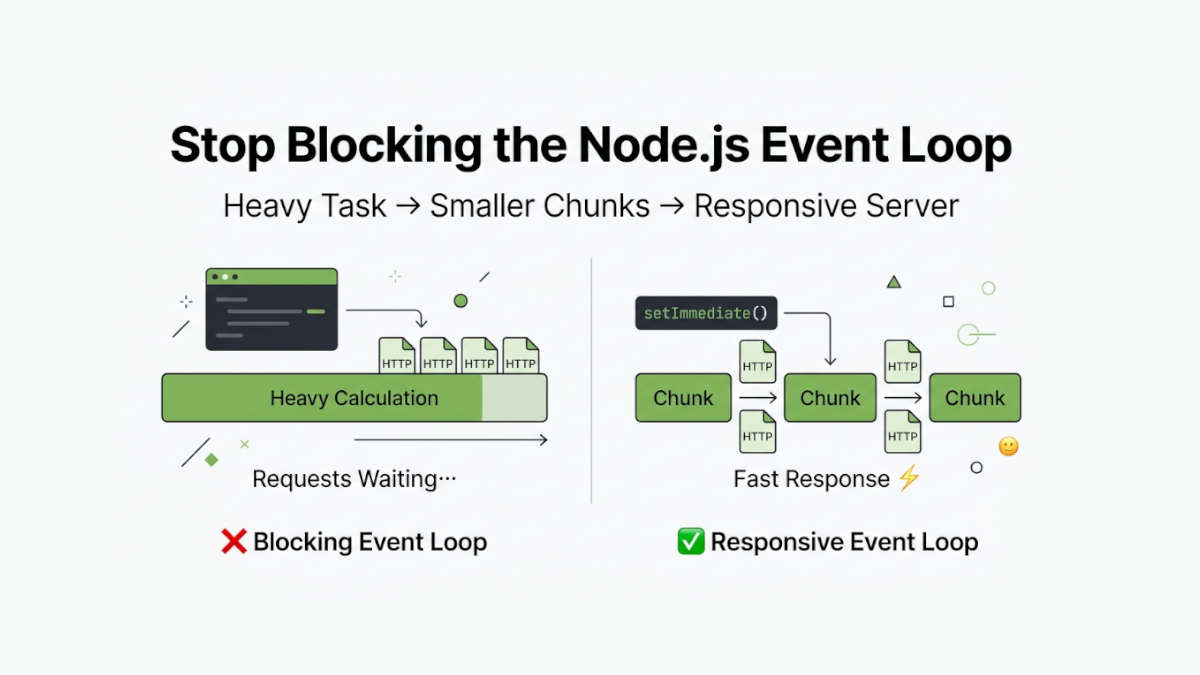
Conceptually, the server is doing this:
Heavy Calculation
████████████████████████████████

Other Requests
❌ Waiting...
The problem is not that Node.js cannot receive multiple requests.
The problem is that the main JavaScript thread is busy and cannot execute the code required to handle them.
Why async and await Alone Won't Fix It
A common mistake is assuming that adding async to the function automatically moves the calculation into the background.
For example:
async function calculateSum() {
  let sum = 0;

  for (let i = 0; i < 5_000_000_000; i++) {
    sum += i;
  }

  return sum;
}
This still blocks the event loop.
The async keyword does not move synchronous CPU-intensive JavaScript to another thread.
The loop is still executed on the main JavaScript thread.
To keep the server responsive, we need to periodically yield control back to the event loop.
The Solution: Break the Work into Smaller Chunks
Instead of processing all 5 billion iterations in one uninterrupted loop, we can divide the calculation into smaller chunks.
After processing each chunk, we temporarily yield control back to the Node.js event loop.
Here is the improved version:
const http = require("http");

async function calculateSum() {
  let sum = 0;

  const LIMIT = 5_000_000_000;
  const CHUNK_SIZE = 5_000_000;

  for (let i = 0; i < LIMIT; i += CHUNK_SIZE) {
    // Calculate one chunk
    for (
      let j = i;
      j < Math.min(i + CHUNK_SIZE, LIMIT);
      j++
    ) {
      sum += j;
    }

    // ✅ Give the event loop a chance
    await new Promise((resolve) => setImmediate(resolve));
  }

  return sum;
}

const server = http.createServer(async (req, res) => {
  if (req.url === "/calculate") {
    const result = await calculateSum();

    return res.end(`Sum = ${result}`);
  }

  res.end("⚡ Fast Response");
});

server.listen(3000, () => {
  console.log("🚀 Server running...");
});
The important line is:
await new Promise((resolve) => setImmediate(resolve));This gives Node.js an opportunity to return to the event loop and process other pending work before continuing with the next chunk.
How Does setImmediate() Help?
Without chunking, the event loop sees one massive synchronous task:
Heavy Calculation
████████████████████████████████

Other Requests
❌ Waiting...
With chunking, the work becomes something like this:
Chunk 1 ███
      ↓
✔ Event Loop processes pending work

Chunk 2 ███
      ↓
✔ Event Loop processes pending work

Chunk 3 ███
      ↓
✔ Event Loop processes pending work
The calculation is still running on the main JavaScript thread.
However, it no longer holds the thread continuously for the entire calculation.
Between chunks, Node.js gets opportunities to handle:
Incoming HTTP requests
Timers
I/O callbacks
Other pending event loop work
This can make the application feel significantly more responsive.
Test the Improved Version
Run the heavy calculation again:
curl http://localhost:3000/calculateThen immediately send another request:
curl http://localhost:3000/This time, the second request should return much sooner:
⚡ Fast ResponseMeanwhile, the /calculate request continues processing its chunks.
The heavy calculation still takes time, but it no longer completely freezes the server for the full duration of the loop.
Responsiveness vs. Throughput: An Important Difference
Chunking CPU work with setImmediate() improves responsiveness, but it does not magically make the calculation faster.
In fact, the total calculation may take slightly longer because the application repeatedly yields control to the event loop.
The benefit is that other requests get opportunities to run.
So the goal is:
❌ Not: Make CPU calculations faster

✅ Yes: Prevent one long task from monopolizing the event loop
This technique is useful when you want to cooperatively divide long-running JavaScript work into smaller pieces.
Choosing the Right Chunk Size
The CHUNK_SIZE value matters:
const CHUNK_SIZE = 5_000_000;If the chunk is too large, each chunk may still block the event loop for too long.
If the chunk is too small, your application may spend too much time repeatedly scheduling the next chunk.
There is no universal perfect chunk size.
A better production approach is often to think in terms of time spent per chunk rather than only the number of iterations. The ideal value depends on:
The calculation being performed
Your server hardware
Your application's latency requirements
The amount of concurrent traffic
Measure and benchmark your application instead of blindly choosing a number.
When Should You Use Worker Threads Instead?
Chunking with setImmediate() is useful for improving event loop responsiveness, but the CPU-intensive work still runs on the main JavaScript thread.
For truly heavy CPU-bound tasks, consider using Worker Threads.
Examples include:
Image processing
Video encoding
Complex data transformations
Cryptographic calculations
AI or machine learning workloads
Large mathematical computations
Worker Threads allow CPU-intensive JavaScript to run on separate threads instead of competing with your main event loop.
A simple rule of thumb is:
Long JavaScript loop that can be divided into small pieces?
→ Chunking + setImmediate() may help

Truly CPU-intensive production workload?
→ Use Worker Threads
Key Takeaway
async and await do not automatically make CPU-heavy JavaScript non-blocking.
If a synchronous operation runs for a long time, it can still block the Node.js event loop and delay every other request.
One useful technique is to:
Break the long-running task into smaller chunks.
Process one chunk at a time.
Use
setImmediate()between chunks.Give the event loop opportunities to process other pending work.
The result is not necessarily higher throughput or faster calculations. The main benefit is better responsiveness.
For extremely CPU-intensive tasks, Worker Threads are usually the better production solution.
But when you have a long-running JavaScript loop that can be processed incrementally, chunking the work with setImmediate() can be a simple and effective Node.js event loop optimization.