Most developers have experimented with Test-Driven Development at least once. You may have written a test, seen it fail, made it pass and said “that’s interesting”. Then you proceeded to how you had always done it.
That’s not a workflow. That’s an experiment.
Test-Driven Development isn’t a habit. The real Test-Driven Development experience isn’t so much about writing tests before code. It’s about the connection between testing, version control, continuous integration, code reviews and deployment. The moment you achieve that, the workflow stops being an experimental practice, and it becomes the machine that moves you forward.
This document shows you exactly how to build that workflow.
What Is a TDD Workflow?
A workflow is a sequence of actions that can be repeated over and over. In the context of Test-Driven Development, it is based on the red-green-refactor cycle.. But there is more; in a TDD workflow, you connect the various components of your pipeline.
This is how it looks in practice:
- You write a test and it fails.
- You make the test pass and the code works.
- You commit the change.
- You push to your team’s trunk.
- Your teammate pulls the change.
- Your teammate writes a test and it fails.
And so it goes on. One action logically leads into the next. In this workflow, the test ceases to be a safety net and becomes a status signal, informing you what to commit, what to push, what to review and when to ship.
Why Most Teams Struggle With TDD?
The biggest hurdle in adopting TDD isn’t the technique itself-it’s the failure to treat it as an integral part of the team’s practices. Teams fail at TDD because they isolate it as a coding practice.
The most common impediments include:
- TDD is a solitary activity. One programmer is busy writing tests while the rest of the team is doing other things.
- TDD doesn't integrate with version control. Developers write tests, but it’s hard to commit them until much later.
- TDD doesn’t have any connection with integration. Local tests pass, but no one knows if they still pass once combined with other changes.
- TDD isn’t involved in deployment. The team is manually testing, and then deployment is a nerve-wracking, manual process.
When tests are only performed in isolation, the act becomes just another item on a to-do list. The value of Test-Driven Development is unleashed when it's woven into a complete workflow.
The Core Idea: TDD as the Engine
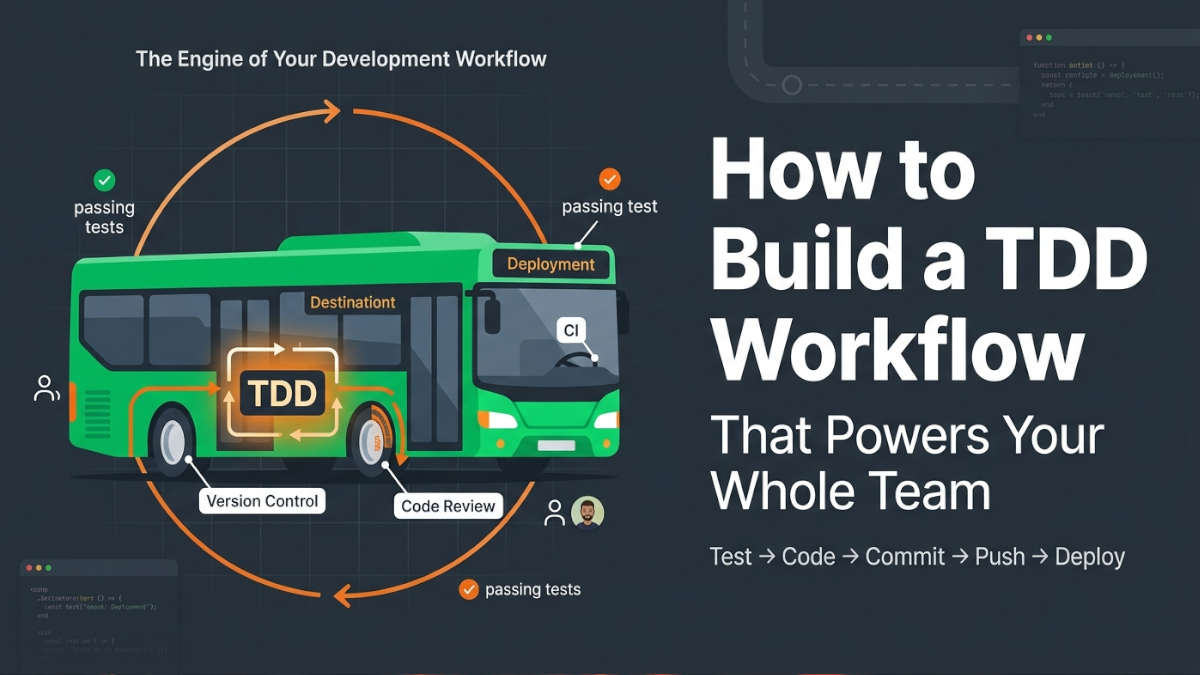
Imagine your development workflow as a bus. Test-Driven Development is the engine.
If the bus is your workflow, TDD is the engine. The other parts won’t function without the engine.
Here's a breakdown of this metaphor:
- Version control-wheels
- Trunk-based integration-steering
- Code reviews-brakes
- Deployment pipeline-destination
When these parts work seamlessly, your bus can consistently deliver small, well-tested, integrated changes. This is the essence of effective Test-Driven Development.
Prerequisites for This Workflow
The following are required for your team to adopt this workflow effectively:
1. Using Version Control
You must have a version control system like Git (or an equivalent). All team members must be capable of:
- Manipulating documents
- Committing documents to a central location
- Fetching documents from other users
- resolving basic conflict issues
2. Having a Common Codebase
This workflow requires that everyone is using the same codebase, not separate forks or disparate branches.
3. Having a Testing Framework
Choose a quick, simple testing framework. The primary goal is to get results quickly when you make changes.
4. Using Continuous Integration
You'll need a CI service (e.g., GitHub Actions, GitLab CI) to run tests automatically whenever code is pushed to the trunk of the repository.
5. Ensuring Team Cooperation
Everyone on the team must understand and agree to follow the workflow.
Step-by-Step: Building the Workflow
Let’s walk through how to implement a team-wide Test-Driven Development workflow.
Step 1: Discuss Instances Before You Write Any Code
Before you even start testing, discuss code behaviors with others. You don’t need to craft a detailed specification-simply engage in a brief conversation with a product owner or a colleague. During this discussion, list all reasonable instances.
For instance, suppose your team is programming a shopping cart:
1. An empty shopping cart should result in a total of 0.
2. Adding an item should increase the total by its price.
3. Adding an item that's already in the cart should update the quantity, not increase the total.
4. Removing an item should decrease the total accordingly.
These instances can now serve as your tests. Why is this so important? Writing tests that correspond to these specific examples turns your technical objects into shared understandings of the system’s functionality.
Step 2: Write a Failing Test
Take the first example and write a test for it.
def test_empty_cart_has_zero_total():
    cart = ShoppingCart()
    assert cart.total() == 0
Run the test. It should fail because ShoppingCart doesn't exist yet.
This is the red step.
Step 3: Make It Pass
Write just enough code to make the test pass.
class ShoppingCart:
    def total(self):
        return 0
Run the test again. It passes.
This is the green step.
Step 4: Commit Immediately
Here's where most people stop. They keep writing code, and they don't commit until the end of the day.
Don't do that.
Commit as soon as the test passes.
git add .
git commit -m "Add ShoppingCart with empty cart total"
Why commit on every green light?
Because a passing test is a known good state. If something breaks later, you can always come back to this point. Small commits also make code review much easier.
Step 5: Push to the Trunk
After committing, push to the shared trunk.
git push origin mainAvoid making a feature branch. There is no need to wait until one "finishes" working on the feature. Pushing should be done right away.
Why is trunk-based development advisable?
Long-lived branches create integration issues. The longer you wait to integrate, the more difficult integration becomes. By pushing changes, you integrate constantly and easily.
Step 6: Allow CI to Work
When you press the button, the CI tool should now run the whole test suite.
If everything was successful, good. Your change is now on the trunk.
If it didn’t pass, fix the issue straight away. Don’t start any other work until the trunk is back to green.
Step 7: Code Review
A code review doesn’t have to be a formal pull request. It may be as simple as:
A colleague looks at your code
They check your diff
They give feedback
You modify your code and check it in again
Essentially, the point of a code review is that it is a process that takes place continuously and not a one-off at the end of the week.
Step 8: Refactor Code
After the code has been committed, integrated and reviewed, make sure to take a look at it.
Ask yourself these questions:
Is the code clear?
Is there any duplication of logic?
Would it be possible to change the code to make it more modular?
If the answer is 'yes' then proceed with refactoring and check your tests again.
Step 9: Ship in Thin Vertical Slices
Do not wait until the whole feature is finished. Ship small parts of the feature soon as they work.
A thin vertical slice means a piece of functionality that touches every part of the system. For example of building the full shopping cart you might first ship the ability to add one item to an empty cart.
This lets real users test the feature early. You get feedback fast.
Step 10: Deploy Automatically
Once your code is on the branch and all tests pass it should be ready to deploy.
Ideally this happens automatically through a deployment pipeline. Every successful build on the branch becomes a release candidate.
If you cannot automate the deployment, at least automate the build and packaging steps. The goal is to cut down on work and reduce human mistakes.
Step 11: Get Feedback. Adjust
After shipping watch how users actually use the software.
Are they using the feature the way you thought they would?
Do they run into issues?
Use that feedback to shape the steps. Then repeat the cycle.
A Practical Example: Building a Login System
Lets walk through a bigger example to see how this works in practice.
The Team Agreement
Your team is building a login system. You meet with the product owner. Agree on these examples:
A user, with valid login credentials can log in
A user with invalid login credentials sees an error
A logged‑in user can log out
A user who is not logged in sees a login form
These are your first four tests.
Developer A: Login Form
Developer A writes the first test:
def test_login_form_displayed_when_not_logged_in():
    response = client.get("/login")
    assert response.status_code == 200
    assert "Login" in response.text
The test fails. Developer A makes it pass by creating a simple login route.
They commit and push to the trunk. CI runs and passes.
Developer B: Valid Login
Developer B pulls the change. They write the next test:
def test_valid_login_redirects_to_dashboard():
    response = client.post("/login", data={"username": "alice", "password": "secret"})
    assert response.status_code == 302
    assert response.headers["Location"] == "/dashboard"
The test fails. Developer B makes it pass by adding a login handler.
They commit, push, and CI runs.
Code Review
Developer A reviews Developer B’s change. Developer A notices the password is checked in text.
That is fine for now says Developer A. We should add hashing soon. Let us make a note.
Developer A does not block the change. Developer A adds a note and moves on.
Deployment
The login form and basic login functionality are now, on the trunk. The team deploys the build to a staging environment.
The product owner logs in. Sees the dashboard.
The product owner says, "Nice ". The product owner wants to see the user’s name on the dashboard.
The team adds that to their list of examples.
The Cycle Continues
Each new feature, each example flows through the same loop:
Test → Code → Commit → Push → CI → Review → Refactor → Deploy → Feedback
Best Practices
1. Keep Tests Fast
If your test suite takes than a few minutes people will stop running it. Make tests fast.
2. Commit on Every Green Light
This habit is the important. A passing test is a checkpoint. Commit when a test passes.
3. Push to Trunk Daily (or More Often)
If you do not push least once a day you create integration risk.
4. Review Small Diffs
Review is easier when diffs are small. If a review takes than ten minutes it is probably too big.
5. Refactor Continuously
Do not wait for a refactoring sprint. Refactor every time you see an opportunity.
6. Get Feedback Early
Ship something small and real as soon as possible. Feedback from users is more valuable, than any test.
Common Mistakes
1. Writing Many Tests at Once
Don't try to write five tests before writing any code. Start with one test. Make it pass. Commit the change. Then move on to the step. This keeps things focused.
2. Skipping the Refactor Step
The refactor step is not optional. It’s what keeps your code clean and easy to change. Don’t skip it just because the test passes. Refactor after each passing test to improve structure and avoid debt.
3. Creating Long-Lived Branches
Branches that stay open for days or weeks are a flag. They mean work is. Not being shared. Push changes to trunk often. Frequent integration keeps the team aligned.
4. Treating CI as Optional
CI should never be optional. If the build is broken stop everything. Fix it. A broken trunk blocks everyone, on the team. Fix it fast so work can continue.
5. Reviewing Code in Batches
Don’t wait to review changes. Big code reviews are hard to focus on. They lead to missed issues and slow feedback. Review changes often. Keep the flow going.
6. Ignoring Feedback from Users
Tests tell you what should happen in theory.. Users tell you what actually matters. Listen to their feedback. It shows you where your software really falls short.
Pros and Cons
Pros
Small focused commits help make the code easier to review. They also make it easier to understand the code. If needed any changes can be reverted easily.
Continuous integration keeps problems manageable. It helps catch issues
Fast feedback allows bugs to be found quickly. This speeds up the process of fixing them.
Shared understanding happens when everyone, on the team uses the examples. These examples become a way to talk about the code.
Code quality improves because refactoring is built into the workflow. It becomes a part of development.
Quick delivery is possible because commits mean progress can be made faster. The project moves forward quickly.
Cons
Requires diligence – I think everyone must follow the process.
Can be time-consuming – I think writing tests takes a lot of time.
Not suitable for every case – I think some efforts, like work might not fit this approach.
Requires setup – I think setting up everything can take time.
Over-testing – I think there is a risk of testing something unnecessarily.
When This Workflow Works Best
This workflow is ideal for:
Teams of 2–10 developers working on the codebase
Web applications and APIs where requirements are reasonably clear
Products that need frequent updates and fast feedback loops
Teams that value code quality and long-term maintainability
Organizations that want to practice continuous delivery
When It Might Not Be the Right Fit
This workflow may not work well for:
Solo developers who don't need to coordinate with others (though the core TDD loop still helps)
Research or exploratory projects where requirements are unknown and code is throwaway
Very large teams where trunk-based development requires more coordination
Legacy codebases without tests. Introducing TDD into untested legacy code takes a different approach
Embedded systems or hardware projects where testing is more complex and slower
Conclusion
Test-Driven Development is more than a coding technique. When you connect it to version control, continuous integration, code review and deployment it becomes a workflow that powers your team.
The key habits are simple:
Write tests from agreed examples
Commit on every green light
Push to the trunk after each cycle
Review changes continuously
Refactor whenever you see a chance
Ship thin vertical slices
Deploy automatically
Listen to feedback
None of these habits is difficult on its own. The challenge is doing them consistently together as a team.
That's what turns Test-Driven Development from an exercise into a shared engine, for continuous delivery.