We shipped forty-seven pull requests last month. That sounds impressive until you learn the uncomfortable truth: only eleven of them came from a human typing an instruction and waiting for a result. The other thirty-six came from a system we built once, tuned twice, and then mostly ignored while it did the grunt work of software maintenance.
That system didn’t exist six months ago. Back then, we were doing what every other team we knew was doing: sitting in front of our tools, describing what we wanted, reading what came back, and repeating the cycle until something worked. It was effective. It was also exhausting, expensive, and fundamentally limited by how many hours we could sit in the chair.
The shift happened when our lead infrastructure engineer said something that sounded borderline heretical at the time: “We shouldn’t be writing individual requests anymore. We should be building the thing that writes the requests for us.”
We pushed back. We asked what that even meant. We worried about runaway costs, about losing control, about shipping code nobody understood. Six months later, we’re here to report back: the concerns were valid, the costs were real, and the payoff was larger than we anticipated.
This is the story of how we moved from prompting individual coding agents to engineering autonomous loops, and why the distinction matters more than we initially believed.
The Breaking Point: Why We Had to Change
Let’s rewind to the moment this all became necessary. We maintain a SaaS platform with roughly 180,000 lines of TypeScript, a Python microservices layer, PostgreSQL, Redis, and the usual constellation of infrastructure. Our team is eight engineers, which means each of us owns a significant surface area.
The warning signs appeared in sequence:
First, the backlog grew faster than we could close it. We had coding agents helping us for over a year. They were genuinely useful. But the workflow was fundamentally serial: one person, one conversation, one task at a time. Every morning, we’d triage issues, pick up the highest-priority ones, and spend the day writing instructions, reviewing output, and repeating.
Second, the context-switching tax became brutal. Every new session meant re-establishing project context. We had documentation, but the agents still needed grounding. We’d paste the same setup instructions, the same conventions, the same “don’t do this thing we learned the hard way” warnings. It felt like onboarding a new contractor every single morning.
Third, and most importantly, the quality ceiling became obvious. When a human reviews every single change, the human becomes the bottleneck. We could only review so much code in a day. We could only hold so much context in our heads. The agents could work faster; we couldn’t.
The turning point was a conversation during sprint planning. Our CTO asked a simple question: “What would happen if we stopped trying to supervise every individual change and instead built a system that supervised itself?”
That question launched our loop engineering initiative.
The Five Components We Had to Build
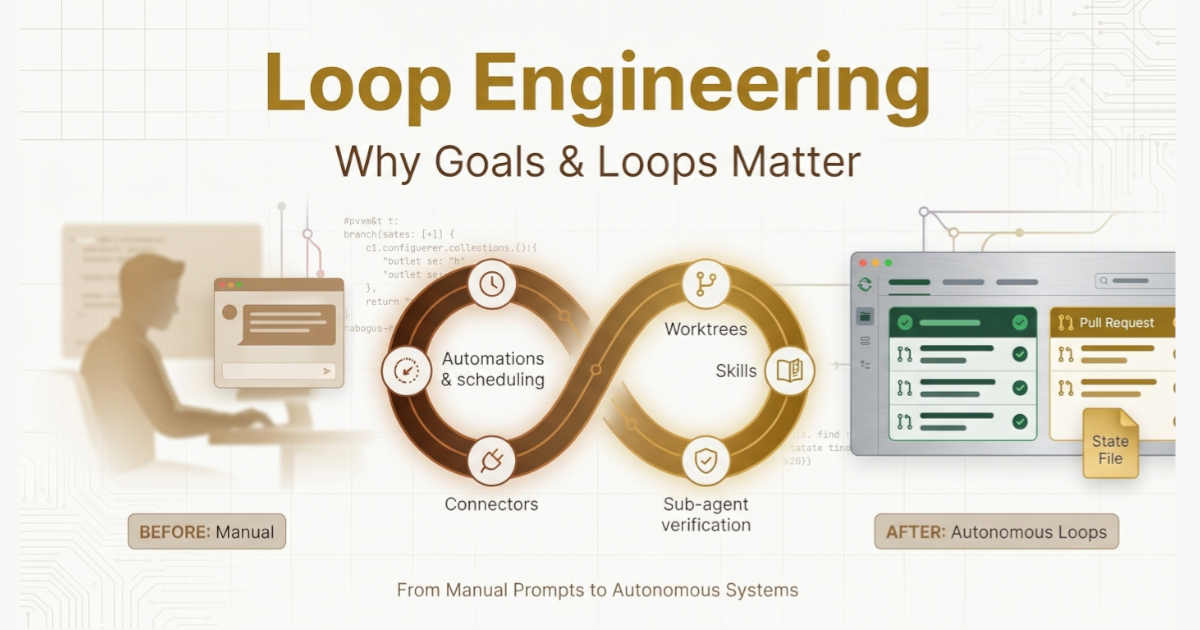
Building a functional autonomous loop turned out to require five distinct pieces, plus one supporting element that we initially undervalued. Here’s the breakdown of what we built, why we built it, and the mistakes we made along the way.
Component One: Scheduled Automations
The heartbeat of any loop is automation. Without a scheduled trigger, you don’t have a loop, you have a one-off run that you manually restart each time.
We started with a single automation: a daily issue triage routine. Every morning at 7:00 AM, before anyone on the team had finished their coffee, the automation ran. It pulled the previous day’s CI failures, scanned open GitHub issues, reviewed recent commits, and produced a summary document with prioritized findings.
The first version of this automation was crude. It ran a single prompt against a single repository. The output was useful but unstructured. The second version called a skill, a packaged set of instructions and reference material, that knew how to categorize issues by severity, route them to the right owner, and flag anything that needed human attention.
The third version was where it got interesting. Instead of just producing a report, the automation started opening worktree branches for issues it identified as high-confidence fixes. It would draft changes in isolation, run the test suite, and then open a pull request with a full explanation of what it changed and why.
That last step, the autonomous pull request, was the moment the loop stopped being a reporting tool and started being a working system.
What we learned: Schedule-driven automations are only as good as their discovery logic. The first iteration found lots of work but couldn’t prioritize effectively. We had to teach the system what “important” meant in our specific context. That teaching happened through skills, which we’ll get to in a moment.
Component Two: Worktree Isolation
The minute we had more than one automation running concurrently, we hit a classic problem: two agents trying to modify the same file at the same time.
The first collision happened during week two. One automation was refactoring a utility function. Another was fixing a bug in the same file. Both created changes independently, both opened pull requests, and both conflicted. We spent half a day untangling the mess.
The solution came from a tool we already understood well: git worktrees. A worktree gives each agent its own working directory on its own branch, sharing the same repository history but never stepping on each other’s files.
We configured our automation system to spin up a dedicated worktree for every parallel task. Each agent got a clean checkout, made its changes in isolation, and then opened a pull request from its own branch. The conflicts disappeared immediately.
What we learned: Parallel execution without isolation is chaos. Parallel execution with isolation is a force multiplier. But isolation introduces its own overhead, each worktree takes time to create, and someone needs to manage the lifecycle. We eventually automated the cleanup too: stale worktrees get archived after 72 hours, and any unmerged changes get flagged for human review.
Component Three: Skills as Persistent Knowledge
This was the component that solved our context-switching tax, and it did more to improve quality than anything else we built.
A skill, in our implementation, is a folder containing a SKILL.md file with instructions and metadata, plus optional scripts, references, and examples. When an agent needs to perform a specific kind of task, say, writing database migrations, it invokes the relevant skill instead of receiving a long prompt from a human.
We started with five skills:
code-style: Our formatting standards, naming conventions, and architectural patterns
testing-standards: How to write tests, what coverage thresholds we expect, which frameworks we use
migration-guide: Step-by-step instructions for database schema changes, including rollback procedures
security-review: A checklist of common vulnerabilities to check before shipping
api-conventions: How we structure REST endpoints, error handling, and authentication
The results were immediate. The quality of autonomous output jumped noticeably once agents could access persistent project knowledge instead of relying on whatever context we remembered to include in each prompt.
What we learned: Skills are how you stop re-explaining your project every single session. But writing good skills is harder than it sounds. A vague skill is worse than no skill at all because it gives the illusion of context without the substance. We eventually adopted a rule: every skill must be specific enough that two different engineers reading it would produce compatible results.
Component Four: Connectors and Plugins
A loop that can only see the filesystem is a loop with limited usefulness. Real engineering involves issue trackers, CI pipelines, monitoring dashboards, communication channels, and databases.
We connected our automation system to:
GitHub: For repository access, pull request creation, and code review
Linear: For issue tracking and project management
Slack: For notifications when the loop needs human attention
Sentry: For error monitoring and crash report analysis
PostgreSQL: For querying production data when diagnosing issues
The connections were built on MCP (Model Context Protocol), which meant we could write a connector once and use it across different tools. This standardization turned out to be more valuable than we expected, it meant we weren’t locked into any single automation platform.
What we learned: The connectors are what turn a reporting tool into an acting system. When the loop can open a PR, update a ticket, and ping a Slack channel all by itself, it stops being a dashboard and starts being a teammate.
Component Five: Sub-Agent Separation
The most important structural decision we made was splitting the creator from the checker.
Early in our journey, we had a single agent handling everything: it would write code, review its own work, and declare itself done. This was predictably problematic. The agent had no ability to critically evaluate its own output. It would produce code that looked correct but contained subtle flaws, a missed edge case, a security vulnerability, a performance issue, and confidently assert that everything was fine.
We changed the structure. Now, when a task comes through the pipeline:
A planner agent examines the issue and creates a detailed plan
A implementer agent writes the code according to that plan
A verifier agent reviews the implementation against the plan and our project standards
The verifier runs with different instructions and often a different model configuration. It’s explicitly told to be suspicious, to look for edge cases, to question assumptions. The verification step catches roughly 30% of issues before they ever reach human review.
What we learned: The model that wrote the code is too generous grading its own homework. A separate verifier is not optional, it’s essential. And the verifier needs real authority: if it rejects a change, that change doesn’t move forward until a human intervenes.
The State File: Why Memory Matters More Than Intelligence
There’s a sixth component that doesn’t appear in most discussions of loop engineering, but it turned out to be the one that made everything else work.
The state file.
Every long-running system needs persistence. The agents we work with have no memory between sessions. Each run starts fresh, with no idea what happened yesterday or last week. Without an external record, the loop would either repeat work endlessly or miss critical context.
Our state file is a markdown document stored in the repository. It contains:
What tasks have been attempted
What succeeded and what failed
What’s currently in progress
What’s blocked and waiting for human input
Key decisions that were made and why
The automation reads this file at the start of every run and updates it at the end. The state file is the spine of the entire system, it’s what allows the loop to pick up where it left off instead of starting from zero every time.
We originally considered using a database or a project management tool for this purpose. The simplicity of a markdown file won us over: it’s visible in code review, it’s versioned alongside the code, and it’s readable by humans without any special tooling.
What we learned: Memory on disk beats memory in context. The agents forget between runs; the state file doesn’t. This is the same principle that underlies all long-running agent systems: external persistence is not an optimization, it’s a requirement.
The Loop in Action: A Concrete Example
Let’s walk through what actually happens when our loop runs. This isn’t a hypothetical, it’s what we observed during a recent week.
Monday, 7:00 AM: The triage automation fires. It reads yesterday’s CI output, checks for new GitHub issues, and reviews recent commit activity. It writes findings to the state file: three CI failures need investigation, two new issues look actionable, one dependency needs updating.
Monday, 7:15 AM: The automation spins up worktrees for the high-confidence fixes. A security patch for a vulnerable dependency gets applied in one worktree. A failing test gets fixed in another. A third worktree starts investigating a flaky test that’s been failing intermittently for weeks.
Monday, 8:00 AM: Each worktree’s changes go through the verification sub-agent. Two changes pass review and open pull requests automatically. The third change, the flaky test investigation, produces inconclusive results and gets routed to the triage inbox for human review.
Monday, 9:00 AM: A human engineer sits down at their desk. They have three things to review: two automated pull requests with clear explanations and passing tests, plus one investigation that needs their expertise. The review takes forty-five minutes.
Tuesday through Friday: Similar cycles repeat. New issues get discovered and triaged. High-confidence fixes get applied automatically. Edge cases get flagged for human attention. The state file tracks everything.
At the end of the week, the team had reviewed and merged 19 automated changes, spent roughly four hours on supervision, and maintained full awareness of what changed in their codebase. The alternative, handling all 19 changes manually, would have consumed at least three times that much engineering time.
The Costs Nobody Talks About
Loop engineering is not free. It’s not even cheap. And the costs come in forms that surprised us.
Token Costs Vary Wildly
The first month after we deployed our automation system, our infrastructure bill tripled. Not gradually, it jumped from one invoice to the next. We were not prepared for this.
The issue was that our loops were running more iterations than necessary. The verification step was thorough but expensive. The planner was generating lengthy plans that mostly repeated information from the state file. The system was working, but it was working wastefully.
We had to adopt a new discipline: token budgeting. Each automation gets a maximum token allowance. If it exceeds that allowance, it gets paused and flagged for human review. We also learned to be more selective about which tasks justified the expense of autonomous handling versus simple human direction.
Quality Requires Constant Vigilance
The second cost is less obvious but more dangerous: verification drift.
In the first month, our autonomous changes were excellent. The verifier caught issues, the implementations were solid, and the human review process was straightforward. By month two, we noticed a subtle decline.
Comprehension Debt Accumulates
The third cost is the most pernicious: comprehension debt.
When code ships faster than you can understand it, the gap between what exists and what you actually grasp grows wider every day. The loop doesn’t care if you’ve read the code. It ships anyway. Six weeks into our automation journey, we realized that several team members couldn’t explain how certain parts of the codebase worked because they had never personally reviewed those changes.
We fixed this by changing our review process.
What We Would Do Differently
If we were starting over, knowing what we know now, we’d make three changes:
Start with the state file, not the automation. The state file is the foundation. Without good state management, everything else degrades. We’d invest in a robust state file from day one.
Build the verifier before the implementer. The verification step is what makes autonomous operation safe. We’d build a strong verifier first, then scale up the implementation capabilities behind it.
Treat skills as a living codebase. Our skills are now reviewed, versioned, and tested just like our application code. We’d adopt that discipline from the beginning instead of treating skills as ad-hoc documentation.
Practical Advice for Teams Starting Out
If you’re considering building your own loops, here’s what we tell teams who ask:
Start small. One automation. One repository. One clear goal. Get that working reliably before you expand.
Invest in your state file. It’s boring, it’s unglamorous, and it’s the difference between a system that compounds and a system that flails.
Separate creation from verification. Don’t let the same agent grade its own homework. This single structural decision will prevent more issues than any other choice you make.
Watch your token costs obsessively. The difference between a cost-effective loop and a money pit is often just a few configuration settings. Monitor usage, set budgets, and investigate anomalies.
Read what your loops produce. The fastest way to lose your grip on a codebase is to let autonomous systems ship changes you never review. Human sign-off is not a formality, it’s the mechanism that keeps you the engineer.
Remember that two teams can build the same loop and get opposite results. One team uses automation to move faster on work they deeply understand. Another team uses it to avoid understanding the work at all. The loop doesn’t know the difference. You do.
The Future We’re Building Toward
Loop engineering is still in its early days. The tools are evolving rapidly, and the best practices are being written in real time by teams like ours who are figuring it out through trial and error.
But the direction is clear. The role of the software engineer is shifting from someone who writes every line of code to someone who designs systems that produce code. The skills that matter are changing: system design, quality assurance, verification strategy, cost management.
None of this means the engineer disappears. It means the engineer’s leverage increases. The same person who once shipped a feature can now ship a system that ships features.
That’s what we’ve learned. That’s why goals and loops matter.
Build the loop. But build it like someone who intends to stay the engineer, not just the person who presses go.