I used to think setting up a database was just… a glorified Excel sheet. That was my mental model for years. Rows, columns, maybe a pivot table if I was feeling fancy. It worked fine for me in the SQL world. MySQL was comfortable. PostgreSQL was fine. I knew where my data lived, I knew how to query it, and life was good.
Then I opened MongoDB for the first time.
I saw the word "Collections" and my brain just stopped working for a second. Wait… no tables? No SQL? Where are the rows? I literally sat there staring at the screen like I was looking at a foreign language. Which, honestly, I kind of was.
If you are coming from the traditional SQL world, the vocabulary shift in MongoDB hits you like a brick wall. You keep looking for a JOIN statement because that is what you have always done. You want to normalize your data. You want to write a query with SELECT and WHERE and all the familiar pieces. But the logic is totally different. And that is the hard part. It is not just syntax. It is the whole way of thinking.
The Mental Shift That Took Me Too Long
I'll admit it. I spent too much time trying to make MongoDB act like SQL. I was designing schemas in 3rd normal form, creating relationships between everything, basically fighting the database instead of working with it.
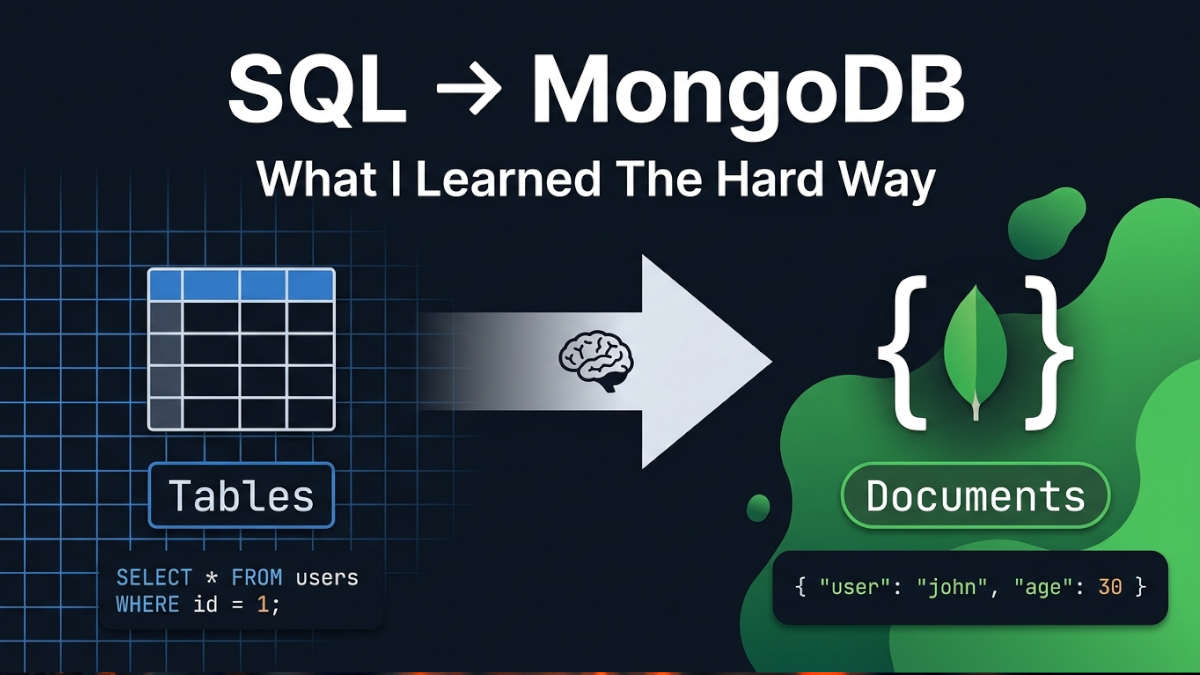
The secret is to stop thinking in tables and begin thinking objects. JSON objects, in particular. Some people may think this is obvious but when your brain has been wired for relational databases for years it is really hard to unlearn.
Here is the simplest way I can break down the hierarchy that finally clicked for me:
Documents: This is just your data. Think of a single JSON object. It is like a "row," but it is flexible. You can add fields, remove fields, nest things inside other things. No rigid structure.
Collections: This is a group of Documents. Think of it as a "table," but it does not enforce a strict schema. One document can have a field that another document simply does not have. And that is okay. That is actually the point.
Databases: This is just a container for your Collections. It is the outer shell. Nothing fancy here.
That is it. There are three levels: Documents inside Collections inside Databases. When I stopped trying to map it one-, to-one with SQL concepts everything began to make sense.
Where I Messed Up
I should probably mention some of the mistakes I made along the way. Maybe it will help someone else avoid them.
First, I kept trying to "JOIN" things. In MongoDB, you usually do not do that. Instead of splitting your data across multiple collections and then joining them back together, you embed related data directly inside the document. This felt wrong at first. Duplicate data? Really? But it is how MongoDB is designed to work. Denormalization is a feature, not a bug.
Second, I was obsessed with enforcing types and required fields. SQL gives you that comfort. You define a schema and the database makes sure everyone follows the rules. MongoDB does not do that by default. You can add validation if you want, but the default philosophy is flexibility. One document can have a phone number as a string, another can have it as a number. It will not stop you. This felt chaotic at first, but eventually I realized it speeds up development because you do not need to run migrations every time your data model changes.
Third, I underestimated how much I relied on SQL's query language. Mongo's query syntax is just JavaScript objects. It is powerful, but it looks nothing like what I was used to. I spent a lot of time googling basic stuff that I could do in my sleep in SQL.
Why It Finally Clicked
The beauty of MongoDB is that the data structure matches how you code. In my backend code I am working with objects. JavaScript objects, Python dictionaries, whatever. When I save something to MongoDB I do not need to break that object into pieces and figure out which tables each piece belongs in. I just push the thing as a Document. It goes in as JSON. It comes out as JSON.
That was the moment everything changed for me. Once I realized that my database was storing data in the shape as my application was using it my development speed went up significantly. I am not exaggerating when I say it felt like 10x faster. Not literally, but it felt like it.
No mapping objects to tables. No writing complex JOIN queries just to get a user and their orders. No more creating migration files every time I add a field. I just write code save the object and move on.
What I Tell People Now
When someone asks me about moving from SQL to MongoDB I say this: the way you write the code is simple. You can learn it in a week. The real challenge is changing the way you think. You need to forget everything you learned about databases.
Stop trying to organize your data in a way that makes sense for a table. Think about how your program works with the data. If you always get a user and their information at the time keep them in the same place. If you always get a blog post and the comments together put the comments, inside the post.
It seems strange at first. I know that.. When it makes sense to you you will ask yourself why you spent so much time with JOINs and changing the data structure.
I broke down the basics of this concept and how to set everything up in a quick guide on my youtube channel if you want a deeper dive: https://www.youtube.com/@web-dev-lab
What was harder for you to unlearn when moving to NoSQL: the syntax or the mental model?
TL;DR: Switching from SQL to MongoDB is not about learning new commands. It is a different way of looking at data. Stop thinking in tables. Start thinking in JSON objects. Documents are like rows Collections are like tables Databases are, like containers. Once you make that change development becomes much faster.