Intro
You've seen CAPTCHA pages a million times. Click the box. Wait a second. Done. It's normal stuff.
But what if that CAPTCHA was fake?
In 2026, a trick called ClickFix became one of the most popular ways hackers break into computers. Microsoft said it was the number one way attackers got in this year. Around 47% of all breaches started this way. And over 100,000 websites have been affected.
Here's the crazy part — these attacks don't need fancy exploits or zero-days. They just trick people into running malware on their own machines.
Let me explain how it works. And more importantly, how to not fall for it.
Learn: 5 Reasons NOT to Learn Python
What Is a ClickFix Attack?
A ClickFix attack is a trick. That's it. No hacking. No breaking in.
The attacker makes you run a bad command on your own computer.
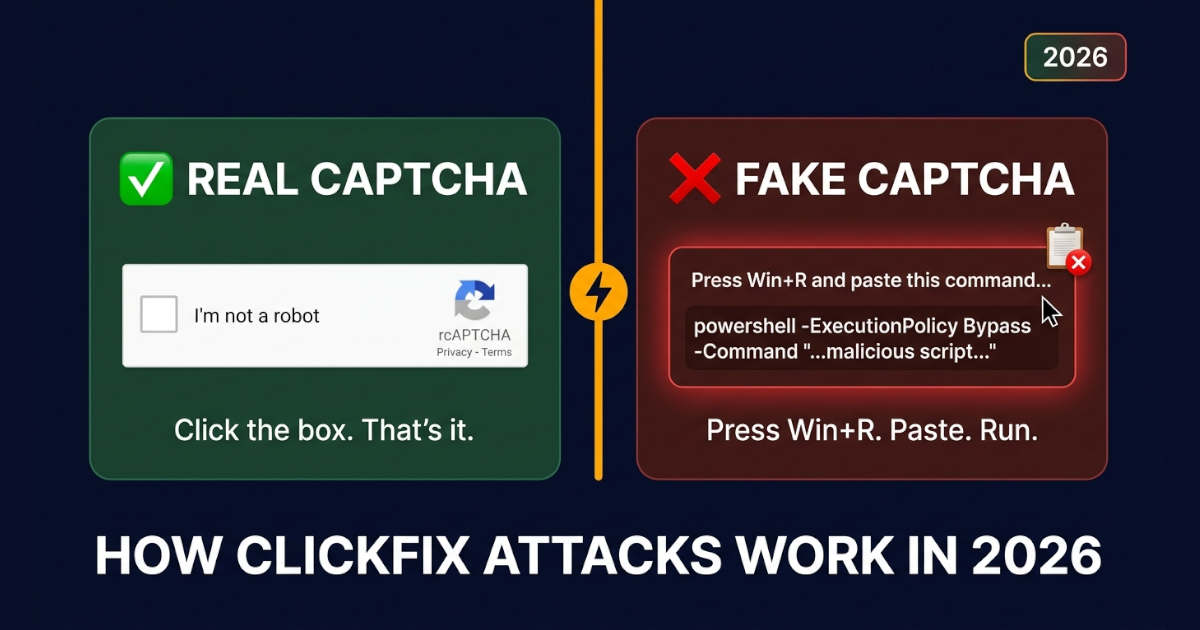
They hide it behind a fake CAPTCHA page that looks totally normal. You click the "verify" button. Then JavaScript secretly copies a command to your clipboard. The page tells you to paste it somewhere — like Windows Run or PowerShell.
If you do it, congrats. You just infected your own PC.
"The attack succeeds not by breaking encryption or guessing passwords, but by turning trusted components against the system." — John Gallagher, VP at Viakoo
That quote sums it up perfectly.
Source: New Russian Infostealer Targeting Ukrainian Users
How ClickFix Attacks Work
Let me walk you through it. It happens in four stages.
Stage 1: The Bait
You land on a normal-looking website. Maybe it's a hair clinic, a bookstore, some random shop. The site got hacked. Attackers injected code that shows a fake Cloudflare check.
Looks real. Has the logo and everything.
Stage 2: The Trick
You click the checkbox. Then the page shows a message:
"To verify you're human, press Windows Key + R, paste this, and hit Enter."
That's the trap. The command is already in your clipboard.
Stage 3: You Do the Dirty Work
You press Win+R. You paste. You hit Enter.
Boom. You just ran the attacker's command. No warning. No download prompt. You did it yourself.
Stage 4: The Payload
The command downloads and runs real malware. Usually an infostealer. That's malware that steals passwords, cookies, and crypto wallets.
In the Lunex campaign from 2026, the stealer hit seven Chromium browsers and a bunch of crypto wallets.
Guide: Skills for AI
Why ClickFix Is So Hard to Stop
Normal security tools have a hard time here. Why?
There's no file to detect.
Normal Attack | ClickFix Attack |
|---|---|
Bad file hits your disk | No file — command runs directly |
Known bad domain gets blocked | Legit hacked sites used instead |
Weird process gets flagged | You run the command yourself |
Signature detection works | Payload is unique every time |
Your antivirus might catch the malware after it downloads. But it can't stop you from pasting a command. The whole chain uses normal system actions. That's what makes it so nasty.
The Lunex Case: A Real Example
In September 2026, researchers at Ontinue found a big ClickFix campaign. It was tied to a malware platform called Lunex.
Here's what happened:
The Chain
Fake CAPTCHA on hacked Ukrainian sites
LunexLoader — bypassed Windows UAC
BYOVD attack — used a weak AMD driver (PDFWKRNL.sys) to turn off security tools
Psychedelic Stealer — grabbed passwords from Chrome, Edge, Brave, and more
What It Stole
7 Chromium browsers: Chrome, Edge, Brave, Yandex, Opera, Opera GX, Vivaldi
5 desktop crypto wallets: Bitcoin Core, Litecoin, Exodus, Atomic Wallet, Electrum
4 extension wallets: MetaMask, MetaMask Legacy, OKX Wallet, SafePal Wallet
The Scary Part
The malware used a real AMD driver to blind security software. Your antivirus showed green. But it was blind. Couldn't see anything.
"Neither HVCI nor the current Microsoft Vulnerable Driver Blocklist prevents the specific PDFWKRNL.sys variant used in this chain from loading." — Ontinue report
Yeah. That's bad.
Tools: 7 Developer Tools
How to Spot a Fake CAPTCHA
Not every CAPTCHA is bad. Here's how to tell.
Real CAPTCHA | Fake CAPTCHA |
|---|---|
Asks you to click a box or solve a puzzle | Asks you to press Win+R or open Terminal |
Stays inside the browser | Gives you keyboard shortcuts |
Never copies anything | Copies commands to your clipboard |
Shows on the site you wanted | Shows on weird pop-ups |
Never asks you to download stuff | Shows "tutorial" videos walking you through steps |
Golden rule: A real CAPTCHA will never ask you to run commands. If a site tells you to press Win+R or paste into PowerShell, close that tab. Right now.
What to Do If You Clicked
Okay, so you messed up. It happens. Act fast.
Do This Now
Disconnect from the internet. Pull the cable or turn off Wi-Fi. Stops data from going out.
Don't reboot yet. Some malware buries deeper on restart.
Run a full antivirus scan. Use something trusted.
Change passwords. But use a different, clean device.
Check your bank. Turn on fraud alerts.
Don't Do This
Don't keep browsing like nothing happened
Don't assume it's fine because "nothing looks wrong"
Don't reuse passwords
Learn: When a CDN Doesn’t Help
How Site Owners Can Prevent ClickFix
If you run a website — especially WordPress — you're a target. Most hacked sites in ClickFix campaigns run WordPress.
Attackers find a bug, inject JavaScript, and boom. Your visitors see fake CAPTCHAs.
Quick Checklist
Keep Stuff Updated
Update WordPress core, themes, plugins
Turn on auto-updates if you can
Delete plugins you don't use
Lock Down Access
Use multi-factor auth
Give people only the access they need
Check user accounts often
Watch for Hacks
Use file monitoring
Set up alerts
Check for fake CAPTCHA overlays
Test Like a User
Attackers hide stuff from scanners
Test in normal browser, incognito, different IPs
Some variants only target real people, not bots
Add a Content Security Policy (CSP)
Strict CSP headers help
Block inline scripts where you can
This stops injected JS from running
How Devs Can Protect Users
If you build web apps, you gotta protect your users.
Stuff That Helps
1. Sanitize Everything
XSS bugs are how attackers inject scripts. Validate and escape all input.
2. Use SRI
Loading third-party scripts? Use Subresource Integrity. Makes sure they weren't messed with.
3. Watch for Weird Stuff
Look for:
PowerShell or cmd.exe running from browser processes
Clipboard hijacking
Fake CAPTCHA elements in the DOM
4. Tell Your Users
If your app ever needs users to run commands, warn them. Explain what real verification looks like.
ClickFix Isn't Alone
There's a whole family of these tricks now.
Variant | What It Abuses |
|---|---|
ClickFix | Windows Run dialog (Win+R) |
FileFix | File Explorer address bar |
TerminalFix | PowerShell or Terminal |
DownloadFix | Fake browser updates |
They all work the same way. You become the execution engine.
Block one, and attackers just switch to another.
Key Takeaways
ClickFix tricks you into running malware yourself
Fake CAPTCHA pages are the main bait — they look like Cloudflare
100,000+ websites have been hacked to serve these attacks
Lunex used ClickFix to drop Psychedelic Stealer on browsers and wallets
Antivirus struggles because there's no file to catch
Protection = awareness + browser defenses + site hardening
If you clicked: disconnect, scan, change passwords from a clean device
Bottom line? Never run a command just because a website told you to.